Thursday, April 29, 2021

Powerful Ways to Boost Your LinkedIn Organic Outreach

Do you want to know how you can increase your LinkedIn Organic Outreach using LinkedIn SEO? Is it hard for you to follow the basics as a beginner? We all know that LinkedIn has made itself one of the fastest growing social media platforms in terms of advertisement. More than 690 million users are currently active on this site for creating links and networking systems. In just the least period, this site has become a powerful professional network all over the globe.


Whether you want to run a company or even if you're going to search for a job, LinkedIn will be a true life savior for you. It will bring together millions of options for you at a professional level. For the B2B Companies, this platform is not less than a treasure to gain worldwide traction.


LinkedIn Organic Outreach


To get started with LinkedIn organic outreach or LinkedIn SEO, you need to know the formulas of:


  • Joining
  • Optimizing the profile
  • Get connected


This is one such common ideology on which LinkedIn operates. If you think the same, then you are completely wrong with this concept! There is much more to do!


Importance of Expanding LinkedIn Organic Outreach with LinkedIn SEO


It is a fact that by increasing your LinkedIn organic outreach links, you are raising your chances to gain more career opportunities as an individual. Companies take the benefit of producing more leads. It even raises the chances to move ahead on the LinkedIn search results ladder.


For extending your network and LinkedIn organic outreach, you need to follow few basic tactics for successful growth. Let’s discuss a few primary and straightforward ways for increasing your LinkedIn SEO outreach:


Leverage your Written Blogs


Blogs are created for different purposes. This can be either for advertisement, networking, or brand creation. The main purpose to create a blog is to interact with the maximum audience and make them hear and see you out.


To share your content on your LinkedIn Company Page, you can use the platform LinkedIn Plus. This tool works as the online news-sharing feed for writing complete articles. You can share your written content with the audience without any restrictions. With LinkedIn Plus, you can:


  • Connect yourself with the target audience. Various industries can also use your content upon your permission.
  • Once you have published the content on LinkedIn, it notifies all your contacts.
  • Make sure your content is engaging, so it can help you to learn more, expand higher, and make some great connections.


Engagement Via Groups


After becoming a member of LinkedIn, you can also join professional communities. With the help of these communities, you can engage yourself with business experts or some well-known names. Plus, you can get into some thoughtful discussions with different individuals related to your content forums to have LinkedIn organic outreach.


Now the main question is how you can locate all such organizations! Well, LinkedIn has made this whole task simple for you. You have to type the name or keyword of the category you are looking for in the Search bar.


Now from the dropdown menu, click the option “group.” Choose the suitable one and later on submit your request for participation. After joining the forum, you can often see which members are associated with the network. Inquire more about the network to maintain your present relationship and have a smooth interaction with the groups.


Share it strategically


No doubt, sharing content is extremely important. But at the same time, you need to be equally strategic as well. It would be best to share such a piece of content that is engaging for the readers to readout. Pay attention to the target demographic. Figure out what your audience wants to read and write something which falls according to their interest level.


Use of Hashtags


How many of you know that you can use hashtags for LinkedIn Search Engine Optimization (SEO)? Well, it sounds exciting, but it is possible! With the help of hashtags, users can easily search for the content or material they are looking for. It even let you know about the total number of users who searched your content.


#LinkedInSEO


Hashtags have always remained a popular medium for Twitter, Instagram, and Facebook content. But now, it has made itself to be the part of LinkedIn as well. Many users feel that using the hashtags for the LinkedIn content won’t bring a professional or a business look. But that’s not true! It will make tremendous sense if you broaden your horizons.


Use Different Formats


The following most crucial technique is about using different formats! It is always the best approach to experiment with some rich media channels. This can be gifs, carousels, or animations in your written blogs. Such formats are excellent to add your blogs with an appealing effect for increasing the interaction.


According to the latest survey, half of the LinkedIn users prefer to add videos to their content for a better representation. But the question is what sort of videos are appropriate for LinkedIn. Let’s give you few suggestions below:


  • Add some industry-related insight videos. These videos can be in the form of instructional or tutorial videos for demonstrating a better industry experience. You can hence use these videos for sharing some valuable information with the audience related to your profession.
  • Try to add some trending news videos. But for that sake, you need to keep a close eye on the world’s latest happenings.
  • We will also recommend you add some promotional videos related to some courses or webinars. In the video context, you can add details about the company or product.
  • Last we have the idea of including some live streaming videos to interact with the audience in real-time. It is similar to the way how you do live streaming on Facebook or Instagram.


Cross-Promoting your Content on Different Platforms


To gain higher exposure, performing cross-promotion is known to be the most effective medium. Any video or article which you have shared on LinkedIn, you can also share on other social media platforms as well. LinkedIn will also prioritize the content for achieving a high algorithm for targeting the massive traffic on the site.


Delivering Value through All Your Posts


To have higher audience participation, it is mandatory that content has to be useful enough for all of them. Higher user engagement means more chances to expand your network. Try to create a content piece that is meaningful for the users, and they can interact with you better through that content.


Your content can include providing some advice and answering some concerns about the market world, or providing valid information. Taking ideas from rivals is also a good option, but make sure you do not copy their ideas.


Conclusion


So this was the end! Well, we hope that with this guide, you will be finding it a lot easy to be a part of LinkedIn and get an incredible outreach. All the LinkedIn SEO techniques we have described above are pretty easy to follow for beginners to grow. Just follow your rivals, see how they have attained success, and later on perform these tactics.


All the Best!

Powerful Ways to Boost Your LinkedIn Organic Outreach

Do you want to know how you can increase your LinkedIn Organic Outreach using LinkedIn SEO? Is it hard for you to follow the basics as a beginner? We all know that LinkedIn has made itself one of the fastest growing social media platforms in terms of advertisement. More than 690 million users are currently active on this site for creating links and networking systems. In just the least period, this site has become a powerful professional network all over the globe.


Whether you want to run a company or even if you're going to search for a job, LinkedIn will be a true life savior for you. It will bring together millions of options for you at a professional level. For the B2B Companies, this platform is not less than a treasure to gain worldwide traction.


LinkedIn Organic Outreach


To get started with LinkedIn organic outreach or LinkedIn SEO, you need to know the formulas of:


  • Joining
  • Optimizing the profile
  • Get connected


This is one such common ideology on which LinkedIn operates. If you think the same, then you are completely wrong with this concept! There is much more to do!


Importance of Expanding LinkedIn Organic Outreach with LinkedIn SEO


It is a fact that by increasing your LinkedIn organic outreach links, you are raising your chances to gain more career opportunities as an individual. Companies take the benefit of producing more leads. It even raises the chances to move ahead on the LinkedIn search results ladder.


For extending your network and LinkedIn organic outreach, you need to follow few basic tactics for successful growth. Let’s discuss a few primary and straightforward ways for increasing your LinkedIn SEO outreach:


Leverage your Written Blogs


Blogs are created for different purposes. This can be either for advertisement, networking, or brand creation. The main purpose to create a blog is to interact with the maximum audience and make them hear and see you out.


To share your content on your LinkedIn Company Page, you can use the platform LinkedIn Plus. This tool works as the online news-sharing feed for writing complete articles. You can share your written content with the audience without any restrictions. With LinkedIn Plus, you can:


  • Connect yourself with the target audience. Various industries can also use your content upon your permission.
  • Once you have published the content on LinkedIn, it notifies all your contacts.
  • Make sure your content is engaging, so it can help you to learn more, expand higher, and make some great connections.


Engagement Via Groups


After becoming a member of LinkedIn, you can also join professional communities. With the help of these communities, you can engage yourself with business experts or some well-known names. Plus, you can get into some thoughtful discussions with different individuals related to your content forums to have LinkedIn organic outreach.


Now the main question is how you can locate all such organizations! Well, LinkedIn has made this whole task simple for you. You have to type the name or keyword of the category you are looking for in the Search bar.


Now from the dropdown menu, click the option “group.” Choose the suitable one and later on submit your request for participation. After joining the forum, you can often see which members are associated with the network. Inquire more about the network to maintain your present relationship and have a smooth interaction with the groups.


Share it strategically


No doubt, sharing content is extremely important. But at the same time, you need to be equally strategic as well. It would be best to share such a piece of content that is engaging for the readers to readout. Pay attention to the target demographic. Figure out what your audience wants to read and write something which falls according to their interest level.


Use of Hashtags


How many of you know that you can use hashtags for LinkedIn Search Engine Optimization (SEO)? Well, it sounds exciting, but it is possible! With the help of hashtags, users can easily search for the content or material they are looking for. It even let you know about the total number of users who searched your content.


#LinkedInSEO


Hashtags have always remained a popular medium for Twitter, Instagram, and Facebook content. But now, it has made itself to be the part of LinkedIn as well. Many users feel that using the hashtags for the LinkedIn content won’t bring a professional or a business look. But that’s not true! It will make tremendous sense if you broaden your horizons.


Use Different Formats


The following most crucial technique is about using different formats! It is always the best approach to experiment with some rich media channels. This can be gifs, carousels, or animations in your written blogs. Such formats are excellent to add your blogs with an appealing effect for increasing the interaction.


According to the latest survey, half of the LinkedIn users prefer to add videos to their content for a better representation. But the question is what sort of videos are appropriate for LinkedIn. Let’s give you few suggestions below:


  • Add some industry-related insight videos. These videos can be in the form of instructional or tutorial videos for demonstrating a better industry experience. You can hence use these videos for sharing some valuable information with the audience related to your profession.
  • Try to add some trending news videos. But for that sake, you need to keep a close eye on the world’s latest happenings.
  • We will also recommend you add some promotional videos related to some courses or webinars. In the video context, you can add details about the company or product.
  • Last we have the idea of including some live streaming videos to interact with the audience in real-time. It is similar to the way how you do live streaming on Facebook or Instagram.


Cross-Promoting your Content on Different Platforms


To gain higher exposure, performing cross-promotion is known to be the most effective medium. Any video or article which you have shared on LinkedIn, you can also share on other social media platforms as well. LinkedIn will also prioritize the content for achieving a high algorithm for targeting the massive traffic on the site.


Delivering Value through All Your Posts


To have higher audience participation, it is mandatory that content has to be useful enough for all of them. Higher user engagement means more chances to expand your network. Try to create a content piece that is meaningful for the users, and they can interact with you better through that content.


Your content can include providing some advice and answering some concerns about the market world, or providing valid information. Taking ideas from rivals is also a good option, but make sure you do not copy their ideas.


Conclusion


So this was the end! Well, we hope that with this guide, you will be finding it a lot easy to be a part of LinkedIn and get an incredible outreach. All the LinkedIn SEO techniques we have described above are pretty easy to follow for beginners to grow. Just follow your rivals, see how they have attained success, and later on perform these tactics.


All the Best!

Powerful Ways to Boost Your LinkedIn Organic Outreach

Do you want to know how you can increase your LinkedIn Organic Outreach using LinkedIn SEO? Is it hard for you to follow the basics as a beginner? We all know that LinkedIn has made itself one of the fastest growing social media platforms in terms of advertisement. More than 690 million users are currently active on this site for creating links and networking systems. In just the least period, this site has become a powerful professional network all over the globe.


Whether you want to run a company or even if you're going to search for a job, LinkedIn will be a true life savior for you. It will bring together millions of options for you at a professional level. For the B2B Companies, this platform is not less than a treasure to gain worldwide traction.


LinkedIn Organic Outreach


To get started with LinkedIn organic outreach or LinkedIn SEO, you need to know the formulas of:


  • Joining
  • Optimizing the profile
  • Get connected


This is one such common ideology on which LinkedIn operates. If you think the same, then you are completely wrong with this concept! There is much more to do!


Importance of Expanding LinkedIn Organic Outreach with LinkedIn SEO


It is a fact that by increasing your LinkedIn organic outreach links, you are raising your chances to gain more career opportunities as an individual. Companies take the benefit of producing more leads. It even raises the chances to move ahead on the LinkedIn search results ladder.


For extending your network and LinkedIn organic outreach, you need to follow few basic tactics for successful growth. Let’s discuss a few primary and straightforward ways for increasing your LinkedIn SEO outreach:


Leverage your Written Blogs


Blogs are created for different purposes. This can be either for advertisement, networking, or brand creation. The main purpose to create a blog is to interact with the maximum audience and make them hear and see you out.


To share your content on your LinkedIn Company Page, you can use the platform LinkedIn Plus. This tool works as the online news-sharing feed for writing complete articles. You can share your written content with the audience without any restrictions. With LinkedIn Plus, you can:


  • Connect yourself with the target audience. Various industries can also use your content upon your permission.
  • Once you have published the content on LinkedIn, it notifies all your contacts.
  • Make sure your content is engaging, so it can help you to learn more, expand higher, and make some great connections.


Engagement Via Groups


After becoming a member of LinkedIn, you can also join professional communities. With the help of these communities, you can engage yourself with business experts or some well-known names. Plus, you can get into some thoughtful discussions with different individuals related to your content forums to have LinkedIn organic outreach.


Now the main question is how you can locate all such organizations! Well, LinkedIn has made this whole task simple for you. You have to type the name or keyword of the category you are looking for in the Search bar.


Now from the dropdown menu, click the option “group.” Choose the suitable one and later on submit your request for participation. After joining the forum, you can often see which members are associated with the network. Inquire more about the network to maintain your present relationship and have a smooth interaction with the groups.


Share it strategically


No doubt, sharing content is extremely important. But at the same time, you need to be equally strategic as well. It would be best to share such a piece of content that is engaging for the readers to readout. Pay attention to the target demographic. Figure out what your audience wants to read and write something which falls according to their interest level.


Use of Hashtags


How many of you know that you can use hashtags for LinkedIn Search Engine Optimization (SEO)? Well, it sounds exciting, but it is possible! With the help of hashtags, users can easily search for the content or material they are looking for. It even let you know about the total number of users who searched your content.


#LinkedInSEO


Hashtags have always remained a popular medium for Twitter, Instagram, and Facebook content. But now, it has made itself to be the part of LinkedIn as well. Many users feel that using the hashtags for the LinkedIn content won’t bring a professional or a business look. But that’s not true! It will make tremendous sense if you broaden your horizons.


Use Different Formats


The following most crucial technique is about using different formats! It is always the best approach to experiment with some rich media channels. This can be gifs, carousels, or animations in your written blogs. Such formats are excellent to add your blogs with an appealing effect for increasing the interaction.


According to the latest survey, half of the LinkedIn users prefer to add videos to their content for a better representation. But the question is what sort of videos are appropriate for LinkedIn. Let’s give you few suggestions below:


  • Add some industry-related insight videos. These videos can be in the form of instructional or tutorial videos for demonstrating a better industry experience. You can hence use these videos for sharing some valuable information with the audience related to your profession.
  • Try to add some trending news videos. But for that sake, you need to keep a close eye on the world’s latest happenings.
  • We will also recommend you add some promotional videos related to some courses or webinars. In the video context, you can add details about the company or product.
  • Last we have the idea of including some live streaming videos to interact with the audience in real-time. It is similar to the way how you do live streaming on Facebook or Instagram.


Cross-Promoting your Content on Different Platforms


To gain higher exposure, performing cross-promotion is known to be the most effective medium. Any video or article which you have shared on LinkedIn, you can also share on other social media platforms as well. LinkedIn will also prioritize the content for achieving a high algorithm for targeting the massive traffic on the site.


Delivering Value through All Your Posts


To have higher audience participation, it is mandatory that content has to be useful enough for all of them. Higher user engagement means more chances to expand your network. Try to create a content piece that is meaningful for the users, and they can interact with you better through that content.


Your content can include providing some advice and answering some concerns about the market world, or providing valid information. Taking ideas from rivals is also a good option, but make sure you do not copy their ideas.


Conclusion


So this was the end! Well, we hope that with this guide, you will be finding it a lot easy to be a part of LinkedIn and get an incredible outreach. All the LinkedIn SEO techniques we have described above are pretty easy to follow for beginners to grow. Just follow your rivals, see how they have attained success, and later on perform these tactics.


All the Best!

Powerful Ways to Boost Your LinkedIn Organic Outreach

Do you want to know how you can increase your LinkedIn Organic Outreach using LinkedIn SEO? Is it hard for you to follow the basics as a beginner? We all know that LinkedIn has made itself one of the fastest growing social media platforms in terms of advertisement. More than 690 million users are currently active on this site for creating links and networking systems. In just the least period, this site has become a powerful professional network all over the globe.


Whether you want to run a company or even if you're going to search for a job, LinkedIn will be a true life savior for you. It will bring together millions of options for you at a professional level. For the B2B Companies, this platform is not less than a treasure to gain worldwide traction.


LinkedIn Organic Outreach


To get started with LinkedIn organic outreach or LinkedIn SEO, you need to know the formulas of:


  • Joining
  • Optimizing the profile
  • Get connected


This is one such common ideology on which LinkedIn operates. If you think the same, then you are completely wrong with this concept! There is much more to do!


Importance of Expanding LinkedIn Organic Outreach with LinkedIn SEO


It is a fact that by increasing your LinkedIn organic outreach links, you are raising your chances to gain more career opportunities as an individual. Companies take the benefit of producing more leads. It even raises the chances to move ahead on the LinkedIn search results ladder.


For extending your network and LinkedIn organic outreach, you need to follow few basic tactics for successful growth. Let’s discuss a few primary and straightforward ways for increasing your LinkedIn SEO outreach:


Leverage your Written Blogs


Blogs are created for different purposes. This can be either for advertisement, networking, or brand creation. The main purpose to create a blog is to interact with the maximum audience and make them hear and see you out.


To share your content on your LinkedIn Company Page, you can use the platform LinkedIn Plus. This tool works as the online news-sharing feed for writing complete articles. You can share your written content with the audience without any restrictions. With LinkedIn Plus, you can:


  • Connect yourself with the target audience. Various industries can also use your content upon your permission.
  • Once you have published the content on LinkedIn, it notifies all your contacts.
  • Make sure your content is engaging, so it can help you to learn more, expand higher, and make some great connections.


Engagement Via Groups


After becoming a member of LinkedIn, you can also join professional communities. With the help of these communities, you can engage yourself with business experts or some well-known names. Plus, you can get into some thoughtful discussions with different individuals related to your content forums to have LinkedIn organic outreach.


Now the main question is how you can locate all such organizations! Well, LinkedIn has made this whole task simple for you. You have to type the name or keyword of the category you are looking for in the Search bar.


Now from the dropdown menu, click the option “group.” Choose the suitable one and later on submit your request for participation. After joining the forum, you can often see which members are associated with the network. Inquire more about the network to maintain your present relationship and have a smooth interaction with the groups.


Share it strategically


No doubt, sharing content is extremely important. But at the same time, you need to be equally strategic as well. It would be best to share such a piece of content that is engaging for the readers to readout. Pay attention to the target demographic. Figure out what your audience wants to read and write something which falls according to their interest level.


Use of Hashtags


How many of you know that you can use hashtags for LinkedIn Search Engine Optimization (SEO)? Well, it sounds exciting, but it is possible! With the help of hashtags, users can easily search for the content or material they are looking for. It even let you know about the total number of users who searched your content.


#LinkedInSEO


Hashtags have always remained a popular medium for Twitter, Instagram, and Facebook content. But now, it has made itself to be the part of LinkedIn as well. Many users feel that using the hashtags for the LinkedIn content won’t bring a professional or a business look. But that’s not true! It will make tremendous sense if you broaden your horizons.


Use Different Formats


The following most crucial technique is about using different formats! It is always the best approach to experiment with some rich media channels. This can be gifs, carousels, or animations in your written blogs. Such formats are excellent to add your blogs with an appealing effect for increasing the interaction.


According to the latest survey, half of the LinkedIn users prefer to add videos to their content for a better representation. But the question is what sort of videos are appropriate for LinkedIn. Let’s give you few suggestions below:


  • Add some industry-related insight videos. These videos can be in the form of instructional or tutorial videos for demonstrating a better industry experience. You can hence use these videos for sharing some valuable information with the audience related to your profession.
  • Try to add some trending news videos. But for that sake, you need to keep a close eye on the world’s latest happenings.
  • We will also recommend you add some promotional videos related to some courses or webinars. In the video context, you can add details about the company or product.
  • Last we have the idea of including some live streaming videos to interact with the audience in real-time. It is similar to the way how you do live streaming on Facebook or Instagram.


Cross-Promoting your Content on Different Platforms


To gain higher exposure, performing cross-promotion is known to be the most effective medium. Any video or article which you have shared on LinkedIn, you can also share on other social media platforms as well. LinkedIn will also prioritize the content for achieving a high algorithm for targeting the massive traffic on the site.


Delivering Value through All Your Posts


To have higher audience participation, it is mandatory that content has to be useful enough for all of them. Higher user engagement means more chances to expand your network. Try to create a content piece that is meaningful for the users, and they can interact with you better through that content.


Your content can include providing some advice and answering some concerns about the market world, or providing valid information. Taking ideas from rivals is also a good option, but make sure you do not copy their ideas.


Conclusion


So this was the end! Well, we hope that with this guide, you will be finding it a lot easy to be a part of LinkedIn and get an incredible outreach. All the LinkedIn SEO techniques we have described above are pretty easy to follow for beginners to grow. Just follow your rivals, see how they have attained success, and later on perform these tactics.


All the Best!
Wednesday, April 28, 2021

Guide: How to Create Linkedin Videos That Work

In this article, our sole focus is on how to create LinkedIn Videos that work. If you are interested in knowing about the working of LinkedIn videos, must-read our article till the end. I assure you that it will be helpful to you, especially if you are a beginner.
Want to incorporate more video into your LinkedIn advertisement? Not sure what relative LinkedIn video you make? You will learn how to make LinkedIn content that interacts with your audience in this post. Start with a video. Content analysis Knowledge and integrity the most important features that consumers look for in a brand, according to a survey, and video will help you achieve both. He is a potent agent for establishing trust. Do you want to know how to create a LinkedIn video that works?


How to create LinkedIn videos that work?


Video platforms are better than email. It will allow you to deliver your message visually and audibly. It can even address the company. Make the brand human and create confidence that will help drive sales times. It will turn consumers into followers by creating suitable types of videos for LinkedIn. Creating a LinkedIn videos marketing plan is not as simple as "aim, fire, and upload." It would help if you were a lot more proactive about your approach.


We all know that a video is flexible, yet it can, like a different type of content in the LinkedIn video advertisement arsenal, take users to the next step. And this step is all about the purchasing process. You aim to determine which types and genre videos are missing or absent from your funnel. Later on, you will fill in the empty blanks. Are you having trouble growing your LinkedIn video advertisement audience? If this is the case, then it's because you are not creating sufficient top-of-funnel innovative video content. Here's how to learn to use a funnel.


Analyze your video content:


Start your video content analysis by gathering all the LinkedIn videos' content you have. Later on, you will be determining where you can fit it into your merchandise funnel. This challenge may seem daunting at first! Hence it is just a mass of figuring out what LinkedIn videos are created to accomplish. Content at the top of the funnel can help viewers purchase in explaining an issue or further understanding. Video material in the middle of the funnel describes how the strategy works. It tells why it is the right choice for your customer.


Content at the bottom of the funnel transforms leads to users. It casts any last-minute doubts on how the approach can work in their particular situation. That's why video recommendations are effective. Hence, social testimony allows your leads to gain confidence in the brand and feel the need to buy. Analyze your competition. Just analyze video content from your competitors on LinkedIn utilize the same method as before.


Does your video fit in your marketing strategy?


Determine how to create LinkedIn videos that work that fit into the overall digital marketing strategy. Scrutinize each video. What was the total number of comments and sections for the video? Were there action notifications (CTAs) for clicked audiences? Can you connect these links to web traffic? You will not see visit information on the site. But you will see interaction numbers. You can get an idea of where and how your competitors are spending. This is done after you finish your review of related video products. There are the following.


They have made several LinkedIn programs. How have they tailored their message to customers at different phases of the sales funnel? How can you get customers' trust so that they can make progress in the buying process? Richard Moore also uses LinkedIn videos to consider the barriers faced by retailers. This is much mandatory to consider when it comes to knowing how to create LinkedIn videos that work. Whether he is one of your distinct competitors, you will find his marketing strategy very helpful. Most of Richard's product is aimed at helping vendors to understand the challenges they face in closing contracts better.


LinkedIn Videos


To entice a wider audience and establish itself as an expert, it holds a weekly live Q&A session. If you reviewed Richard's LinkedIn images, you would see the points raised above. These videos will also help him enhance his status as a service provider for incorporated sales or trading teams. # 2: Decide what kind of LinkedIn videos you will make. LinkedIn video advertisement is not scanty to the most popular platforms such as broadcasts or ads.


Streaming Video:


In recent years, live video has become increasingly popular. People can now access content through various devices, thanks to the widening of OTT video apps. By a Livestream study, 80% of people prefer to watch live videos than to read any blog posts. LinkedIn Live Events coverage is a powerful way to engage buyers. You should know this fact in terms of how to create LinkedIn videos that work.


It allows you to solve problems faced by customers by answering questions. You will be on the way to seek a method like mine, allowing you to shorten the trading revolution. For example, in this segment of the VDoorLockSmith Show, David Gibson cross-examines AronDeen, Ulterra's exec of trading. The live stream enters Deen's career path and Ulterra's solutions.


Tutorials and videos:


How to do Tutorial content is one of the most popular content types on the internet. And, when it comes to LinkedIn, it's a good idea to put helpful tutorials in the right place. This is much mandatory to consider when it comes to knowing how to create LinkedIn videos that work. Expert members of LinkedIn make it an excellent forum for aggrandizing your educational content.


Culture and Videos:


Behind-the-Scenes Businesses create videos that convey the culture of their company or show how their ideas are formed. This is done to develop their value postulation as they become more aware of the importance of being more human. These behind-the-scenes videos of Blickle's stamping tool are made to take a closer examination at messengers to the process.


Opinion Management Videos:


It's not always easy to stand out in a competitive market, but leadership videos believe that will help. Maybe you're showcasing new research, sharing an interesting view of your business, or answering questions that many didn't consider in a LinkedIn video to show thought leadership. This is a crucial element to consider when learning how to create LinkedIn videos that work.


In-depth interviews:


Buyers can get an edgy review look at a problem or a new vision or approach from industry experts by watching video interviews. You should know this fact in terms of how to create LinkedIn videos that work. Or they can help the customers on the buyer's path by positioning the brand as a thought leader.


In this Linkedin video, David McGlennen, a gassed-up culture coach, interviews a video strategist, Rich Cardona. In conjunction, David and Rich delve into the world of company video and how they use it to create their own companies.


Video Ads:


Although video ads are not a new hypothesis, they are trendy on LinkedIn. According to the site, members spend nearly three times more of their time watching video ads than they do on static-backed content. Don't hesitate to use LinkedIn advertising if you're on the hedgerow.


In addition to the attention the video ads attract on LinkedIn, the platform also provides a series of tools that help you to catch leads and monitor ROI. This makes it easier to access. -out if your context is fitting to your audience. The length of the advert, which is the subject of discussion, will vary widely. 15-second ads have always been the most effective. LinkedIn proved this.


How to make LinkedIn videos made by you more successful?


I have some steps here to help you maximize LinkedIn videos made by you for the manifesto once you have decided what types of videos to make. Use native video on LinkedIn. While there is no definitive proof that indigenous videos of LinkedIn take precedence over video links to other sites, I believe the LinkedIn algorithm does. You should know this fact in terms of how to create LinkedIn videos that work. What is the reason for this? LinkedIn, like all social media sites, makes money from ads. Supported content generates more sales as more people consume it. As a result, removing members from LinkedIn to watch videos on other sites is very inconvenient.


While you have other platforms, make LinkedIn native video a priority as it gives members a better experience. They are not redirected to another website, which makes it easier for them to consume your content.


According to Alexa, LinkedIn video advertisement users spend almost 11 minutes each era or period on the website. If you are using film, straight-away gets down to the brass tacks. You will leave a remarkable impression, and members will be more likely to use it every day. When the video still is engaging, make a strong or hard copy. It will help the audience prepare for what they are about to see. This is much mandatory to consider when it comes to knowing how to create LinkedIn videos that work.


According to a LinkedIn study, 54 percent of people are attracted by the video headlines and watch until the end.
Use a clear and straightforward CTA. CTAs might appear to be self-explanatory, but people often misunderstand them. They are not supposed to be about selling or producing all the time. They are used to build stronger connections between you and your audience. Let's assume you want to take a picture; knowing that your audience is using Instagram, you must invite them to interact with you to be aware of the creative ideas and contents that they won't find anywhere else.


Include descriptions:


Most people don't know that most of the videos on LinkedIn are seen by the viewers without audio or background sounds. About 80% of LinkedIn videos are viewed like this. Members watch subtitled videos more than audio ones and are more involved with subtitled videos. Conclusion It is no secret that buyers will want more information before making a purchase. LinkedIn video advertisement is an excellent addition to each brand's context trading strategy. Three key elements are available in every successful LinkedIn video. This includes Relevance: Addressing any problems or buyer barriers at a specific level of the funnel. Content is not consumed upon in the same order or straight line, as advertisers are well aware.


How to create LinkedIn videos that work with a Message?


This should not stop you from making or posting videos relevant to the LinkedIn videos. To create content with an important announcement, you need to dig deep. Try to use the intimate knowledge of your customers! Figure out what your customers are looking for and what they need. Rich features offer the customer more than he or she would be able to get elsewhere. You should know this fact in terms of how to create LinkedIn videos that work.
On the other hand, delivering unparalleled value is not as difficult as it seems. It's about providing information that empowers customers. It is all about answering questions from your audience. Linked content assists users in their decision-making process. When your customers connect with and experience your brand, they will be looking forward to your content. You will be providing for the things your customers constantly need.


Why is the Call to Action (CTA)s Important?


We all know that CTAs, or calls to action, are essential! This is because they are creating a coherent message with linked video content, which is quite crucial. Your audience needs to know and see that you are the leading expert on a topic. Provide them with the hot news of knowledge so that they can achieve their goal by consistently positioning your brand and solution. This is how you can learn how to create LinkedIn videos that work. By incorporating these three elements into every LinkedIn video you make, they seem to be at a high level.


You'll have enough details about how to create LinkedIn videos that work to make your videos compelling. This is only possible when you've your targeted audience and you know what they need. So, this will get them to reach the future action for the purchaser's expedition.

Guide: How to Create Linkedin Videos That Work

In this article, our sole focus is on how to create LinkedIn Videos that work. If you are interested in knowing about the working of LinkedIn videos, must-read our article till the end. I assure you that it will be helpful to you, especially if you are a beginner.
Want to incorporate more video into your LinkedIn advertisement? Not sure what relative LinkedIn video you make? You will learn how to make LinkedIn content that interacts with your audience in this post. Start with a video. Content analysis Knowledge and integrity the most important features that consumers look for in a brand, according to a survey, and video will help you achieve both. He is a potent agent for establishing trust. Do you want to know how to create a LinkedIn video that works?


How to create LinkedIn videos that work?


Video platforms are better than email. It will allow you to deliver your message visually and audibly. It can even address the company. Make the brand human and create confidence that will help drive sales times. It will turn consumers into followers by creating suitable types of videos for LinkedIn. Creating a LinkedIn videos marketing plan is not as simple as "aim, fire, and upload." It would help if you were a lot more proactive about your approach.


We all know that a video is flexible, yet it can, like a different type of content in the LinkedIn video advertisement arsenal, take users to the next step. And this step is all about the purchasing process. You aim to determine which types and genre videos are missing or absent from your funnel. Later on, you will fill in the empty blanks. Are you having trouble growing your LinkedIn video advertisement audience? If this is the case, then it's because you are not creating sufficient top-of-funnel innovative video content. Here's how to learn to use a funnel.


Analyze your video content:


Start your video content analysis by gathering all the LinkedIn videos' content you have. Later on, you will be determining where you can fit it into your merchandise funnel. This challenge may seem daunting at first! Hence it is just a mass of figuring out what LinkedIn videos are created to accomplish. Content at the top of the funnel can help viewers purchase in explaining an issue or further understanding. Video material in the middle of the funnel describes how the strategy works. It tells why it is the right choice for your customer.


Content at the bottom of the funnel transforms leads to users. It casts any last-minute doubts on how the approach can work in their particular situation. That's why video recommendations are effective. Hence, social testimony allows your leads to gain confidence in the brand and feel the need to buy. Analyze your competition. Just analyze video content from your competitors on LinkedIn utilize the same method as before.


Does your video fit in your marketing strategy?


Determine how to create LinkedIn videos that work that fit into the overall digital marketing strategy. Scrutinize each video. What was the total number of comments and sections for the video? Were there action notifications (CTAs) for clicked audiences? Can you connect these links to web traffic? You will not see visit information on the site. But you will see interaction numbers. You can get an idea of where and how your competitors are spending. This is done after you finish your review of related video products. There are the following.


They have made several LinkedIn programs. How have they tailored their message to customers at different phases of the sales funnel? How can you get customers' trust so that they can make progress in the buying process? Richard Moore also uses LinkedIn videos to consider the barriers faced by retailers. This is much mandatory to consider when it comes to knowing how to create LinkedIn videos that work. Whether he is one of your distinct competitors, you will find his marketing strategy very helpful. Most of Richard's product is aimed at helping vendors to understand the challenges they face in closing contracts better.


LinkedIn Videos


To entice a wider audience and establish itself as an expert, it holds a weekly live Q&A session. If you reviewed Richard's LinkedIn images, you would see the points raised above. These videos will also help him enhance his status as a service provider for incorporated sales or trading teams. # 2: Decide what kind of LinkedIn videos you will make. LinkedIn video advertisement is not scanty to the most popular platforms such as broadcasts or ads.


Streaming Video:


In recent years, live video has become increasingly popular. People can now access content through various devices, thanks to the widening of OTT video apps. By a Livestream study, 80% of people prefer to watch live videos than to read any blog posts. LinkedIn Live Events coverage is a powerful way to engage buyers. You should know this fact in terms of how to create LinkedIn videos that work.


It allows you to solve problems faced by customers by answering questions. You will be on the way to seek a method like mine, allowing you to shorten the trading revolution. For example, in this segment of the VDoorLockSmith Show, David Gibson cross-examines AronDeen, Ulterra's exec of trading. The live stream enters Deen's career path and Ulterra's solutions.


Tutorials and videos:


How to do Tutorial content is one of the most popular content types on the internet. And, when it comes to LinkedIn, it's a good idea to put helpful tutorials in the right place. This is much mandatory to consider when it comes to knowing how to create LinkedIn videos that work. Expert members of LinkedIn make it an excellent forum for aggrandizing your educational content.


Culture and Videos:


Behind-the-Scenes Businesses create videos that convey the culture of their company or show how their ideas are formed. This is done to develop their value postulation as they become more aware of the importance of being more human. These behind-the-scenes videos of Blickle's stamping tool are made to take a closer examination at messengers to the process.


Opinion Management Videos:


It's not always easy to stand out in a competitive market, but leadership videos believe that will help. Maybe you're showcasing new research, sharing an interesting view of your business, or answering questions that many didn't consider in a LinkedIn video to show thought leadership. This is a crucial element to consider when learning how to create LinkedIn videos that work.


In-depth interviews:


Buyers can get an edgy review look at a problem or a new vision or approach from industry experts by watching video interviews. You should know this fact in terms of how to create LinkedIn videos that work. Or they can help the customers on the buyer's path by positioning the brand as a thought leader.


In this Linkedin video, David McGlennen, a gassed-up culture coach, interviews a video strategist, Rich Cardona. In conjunction, David and Rich delve into the world of company video and how they use it to create their own companies.


Video Ads:


Although video ads are not a new hypothesis, they are trendy on LinkedIn. According to the site, members spend nearly three times more of their time watching video ads than they do on static-backed content. Don't hesitate to use LinkedIn advertising if you're on the hedgerow.


In addition to the attention the video ads attract on LinkedIn, the platform also provides a series of tools that help you to catch leads and monitor ROI. This makes it easier to access. -out if your context is fitting to your audience. The length of the advert, which is the subject of discussion, will vary widely. 15-second ads have always been the most effective. LinkedIn proved this.


How to make LinkedIn videos made by you more successful?


I have some steps here to help you maximize LinkedIn videos made by you for the manifesto once you have decided what types of videos to make. Use native video on LinkedIn. While there is no definitive proof that indigenous videos of LinkedIn take precedence over video links to other sites, I believe the LinkedIn algorithm does. You should know this fact in terms of how to create LinkedIn videos that work. What is the reason for this? LinkedIn, like all social media sites, makes money from ads. Supported content generates more sales as more people consume it. As a result, removing members from LinkedIn to watch videos on other sites is very inconvenient.


While you have other platforms, make LinkedIn native video a priority as it gives members a better experience. They are not redirected to another website, which makes it easier for them to consume your content.


According to Alexa, LinkedIn video advertisement users spend almost 11 minutes each era or period on the website. If you are using film, straight-away gets down to the brass tacks. You will leave a remarkable impression, and members will be more likely to use it every day. When the video still is engaging, make a strong or hard copy. It will help the audience prepare for what they are about to see. This is much mandatory to consider when it comes to knowing how to create LinkedIn videos that work.


According to a LinkedIn study, 54 percent of people are attracted by the video headlines and watch until the end.
Use a clear and straightforward CTA. CTAs might appear to be self-explanatory, but people often misunderstand them. They are not supposed to be about selling or producing all the time. They are used to build stronger connections between you and your audience. Let's assume you want to take a picture; knowing that your audience is using Instagram, you must invite them to interact with you to be aware of the creative ideas and contents that they won't find anywhere else.


Include descriptions:


Most people don't know that most of the videos on LinkedIn are seen by the viewers without audio or background sounds. About 80% of LinkedIn videos are viewed like this. Members watch subtitled videos more than audio ones and are more involved with subtitled videos. Conclusion It is no secret that buyers will want more information before making a purchase. LinkedIn video advertisement is an excellent addition to each brand's context trading strategy. Three key elements are available in every successful LinkedIn video. This includes Relevance: Addressing any problems or buyer barriers at a specific level of the funnel. Content is not consumed upon in the same order or straight line, as advertisers are well aware.


How to create LinkedIn videos that work with a Message?


This should not stop you from making or posting videos relevant to the LinkedIn videos. To create content with an important announcement, you need to dig deep. Try to use the intimate knowledge of your customers! Figure out what your customers are looking for and what they need. Rich features offer the customer more than he or she would be able to get elsewhere. You should know this fact in terms of how to create LinkedIn videos that work.
On the other hand, delivering unparalleled value is not as difficult as it seems. It's about providing information that empowers customers. It is all about answering questions from your audience. Linked content assists users in their decision-making process. When your customers connect with and experience your brand, they will be looking forward to your content. You will be providing for the things your customers constantly need.


Why is the Call to Action (CTA)s Important?


We all know that CTAs, or calls to action, are essential! This is because they are creating a coherent message with linked video content, which is quite crucial. Your audience needs to know and see that you are the leading expert on a topic. Provide them with the hot news of knowledge so that they can achieve their goal by consistently positioning your brand and solution. This is how you can learn how to create LinkedIn videos that work. By incorporating these three elements into every LinkedIn video you make, they seem to be at a high level.


You'll have enough details about how to create LinkedIn videos that work to make your videos compelling. This is only possible when you've your targeted audience and you know what they need. So, this will get them to reach the future action for the purchaser's expedition.

Thursday, April 22, 2021

LinkedIn Lead Generation Forms: The Easy Way to Huge B2B Lead Gen

The most innovative and effortless way to collect quality leads created For Marketing Professionals and Brands.


LinkedIn Lead Gen Forms designed for potential customers that usually don't want to fill out the form on mobile sites to get a piece of valuable content for their needs in return. Because, sincerely said, it generally isn't that easy to generate marketing qualified leads on a mobile site, right?


LinkedIn Lead Generation Forms


We, from Linked Assist, are excited to talk about the LinkedIn Lead Generation Forms and hope that people worldwide understand its value.


This marketing solution will help you generate more quality leads from your sponsored content campaigns by removing the most significant hurdle of getting someone to fill out a clunky contact form on a smartphone.


The LinkedIn Lead Gen Forms feature makes it super easy to collect leads, from approximately 700 million business experts, influencers and industry leaders on LinkedIn, than ever before.


You ask me Why?


Simply because, when people click on your ads, their LinkedIn profile information automatically populates an in-app form that they can submit instantly; without typing their information manually.


Once someone submits the Lead Gen Form, you will receive a complete lead record that includes that person's name and contact information, company name, location, job title and more. The data you receive comes from a LinkedIn profile, and it's more accurate and complete than you would get from a traditional web form, where people often provide misleading pieces of information.


After submitting a form, you can give members an in-app "thank you" page that will immediately link them to your content or send them to your site to learn more.


After the form is submitted, you can forward your persona through an in-app "thank you" page that immediately drives them into your marketing funnel and connects them with your business objective.


Lead Gen Forms are a significant milestone in LinkedIn's ongoing efforts to help marketers like you drive more ROI from their campaigns. The Social Media Giant aims to continuously simplify it to allow you to measure your return and maximize outcomes for a successful business.


What Are the Benefits of using LinkedIn Lead Gen forms


Exceed your request gen targets: Ninety percent of customers surveyed met their cost-per-lead (CPL) targets.
People additionally saw lower CPLs with Linkedin Lead Gen Forms compared to their regular Sponsored campaigns.


But it's the quality of the guides that their customers say they value most: LinkedIn's professional audience and accurate profile data help them gather more likely leads.


Measure Your ROI: Their LinkedIn Campaign Manager reporting tools monitor essential metrics such as CPL, form fill rate, and other critical data points to determine the value you are getting from your advertising spend. In short, LinkedIn Lead Generation Forms also offers demographic reports that show the exact number of leads you are getting from specific segments of your audience.


Manage your leads easily: With LinkedIn Lead Gen Forms will your lead management be seamless. You can download your lists from Campaign Manager or sync leads with LinkedIn Marketing Automation Tools or CRM system through their partners Zapier and Driftrock. Marketers can send their data directly to their Marketo, Oracle Eloqua, and Microsoft Dynamics 365 accounts.


"Lead Gen Forms offers a smooth process for connecting with customers. Within minutes, you can create a campaign and start generating quality leads," LinkedIn Lead Gen Forms has improved customer experience heavily with sponsored content, as well as form-filling rates.


The best ad unit to get the best bang for your lead-gen buck. " we are confident that a mobile-first approach to Lead Gen Forms will deliver the best results for the advertiser.


How to use LinkedIn Lead Generation Forms


https://youtu.be/SAAE4c5Efgg


They also allow advertisers to use Lead Gen Forms on Sponsored InMail campaigns for mobile devices and desktops.


Discover more about LinkedIn Lead Gen Forms at Social Media Examiner here, or if you're ready to give them a try, sign up for Campaign Manager to build your campaign today.

Wednesday, April 21, 2021

What is LinkedIn Live and How to Use It in Your Marketing Plan

LinkedIn has almost 700 million active users and has become one of the leading social network platforms.


In 2020, it was stated that LinkedIn Live would likewise become available to business pages.


With this statement, LinkedIn chose "to bring you a tighter combination between LinkedIn Events and LinkedIn Live, by turning these two items into a new service that allows you to stay linked to your communities and meet your consumers anywhere they are."


Live streaming continues to acquire appeal amongst audiences. In truth, in 2019, web users enjoyed 1.1 billion hours of live video.


Additionally, according to Go-Globe, live streaming is expected to make up 82% of all website traffic.


Furthermore, LinkedIn Live streams have increased by 158% given that February 2020. Despite the fact that LinkedIn Live isn't available to all companies today, it might be time to begin thinking about live streaming. To begin with LinkedIn Live, you can finish an application online to end up being a Live broadcaster.


In this article, let's analyze how you can leverage LinkedIn Live in your marketing plan to bring in new audiences.


Essential steps to use LinkedIn for marketing and networking


LinkedIn Live


The live streaming feature of LinkedIn called "LinkedIn Live" enables you to stream live video to your audience to drive engagement and develop deeper connections.


LinkedIn Live videos usually get seven times more reactions and 24 times more comments than native videos produced by the same broadcasters.


LinkedIn, known as the expert social networks network, is a great place to stream live videos since you can truly learn more about your audience and engage with them in a manner that companies have not been able to do before.


Now that you understand what LinkedIn Live is and why you need to utilize it, let's dive into the logistics.


How to use LinkedIn Live


  1. Apply For the LinkedIn Live profile feature.
  2. Subscribe for a third-party video streaming SaaS.
  3. Connect LinkedIn Live Events to your video streaming software
  4. Write an appealing headline and description for your live stream.
  5. Start your live stream by using your third-party software.


1. LinkedIn Live Application


To get started with LinkedIn Live, it requires applying to have the feature enabled to your profile.


You'll be asked if you wish to live stream from your profile or your LinkedIn company page and the link to the page you want to stream from during the application process.


If you want to stream from a company page, you'll likewise need to consist of the profile URL of the page admins. Only up to three-page admins can have the capability to stream from your service page.


When you have applied, it's time to wait for the approval. Be sure to keep looking at this because you do not wish to miss the alert you have gotten to LinkedIn Live.


2. Subscribe for a third-party video streaming SaaS.


Before you can go live on LinkedIn, you'll need to subscribe to a video streaming service because LinkedIn does not provide native streaming currently.


You can utilize tools like Socialive or StreamYard. These tools are very helpful for going live on a desktop. They can make it simpler to see comments and interact with your audience during the stream.


3. Connect LinkedIn Live Events to your third-party video streaming software.


After you've applied for your LinkedIn streaming tool and got approved for LinkedIn Live, now it's time to connect LinkedIn Live with your third-party streaming tool.


To do so, log in to your 3rd-party software and go to the location where you can include streaming locations (this will alter depending on the tool you're using).


As soon as you find the right location to add a streaming place, you need to click a profile and connect from there.


4. Write an appealing headline and description for your live stream.


After LinkedIn Live and the video-streaming software are linked, you're all set to go live by clicking the "Go live" button or start streaming.


Before the platform begins live streaming, you'll see an area to compose a title and description for the stream.


Make sure to carefully define what users can aspect and what's all about in the live event. This will keep their interest and help make your audience excited about the live stream.


5. Start your live stream by using your third-party software.


Ensure your camera and microphone are correctly set up before you go live. You'll likewise want to control the video camera position, audio & video quality, and your background. Your video necessitates looking professional, primarily considered that LinkedIn is a social network for professionals.


Now, we understand what LinkedIn Live is and how to begin, but you might question, "How can I use this tool?" Let's dive in below.


5 Ways to Use LinkedIn Live


  1. Promote Events
  2. Demonstrate Knowledge & Ability
  3. Attract Employees
  4. Promote Products or Announce a Collaboration
  5. Gain Brand Awareness and Authority in your Industry


Promote Events


With the recent integrated combination of LinkedIn Live and LinkedIn Events, the social networks platform is a terrific location to host your virtual occasions.


Virtual events permit you to join your viewers and host your event in a trusted and granted environment.


Moreover, hosting a virtual event on LinkedIn Live will assist you in bringing in your target professional audience.


You can share your events with your service page fans, plus you can send out event invites to your first-degree profile connections.


Rather than taking videos throughout your virtual conference and publishing them later, LinkedIn Live enables you to con with your audience in real-time.


According to a study, LinkedIn Live events receive 23 times more comments and six times more responses than native videos.


When using it, you can join and interact with your connections and followers in real-time throughout your virtual events.


Demonstrate Knowledge & Ability


Not to be redundant, however, ending up being an authority in your market is a crucial part of your marketing method.


LinkedIn Live provides an excellent chance to display your competence.


Using live streaming technology, you can share your pointers and techniques with your audience. To do this, brainstorm how-to subjects that your audience is interested in.


If you're struggling to develop concepts, consider repurposing old content like an article or YouTube videos.


Producing live-streaming material will assist you in increasing your content marketing strategy.


Attract Employees


LinkedIn is among the primary hubs for employers and job-seekers alike. Hiring is one of the leading benefits of having a profile for people and brand names.


With LinkedIn Live, you can sustain your recruiting efforts by introducing your team, presenting your workplace culture, and answering your audience questions.


Also, you can host a live panel with workers on what it's like to work for your business. Employees can talk about their work experience and advise people who are interested in working for your company.


Furthermore, you can host a Q&A with numerous people in your organization to highlight their particular tasks. You can introduce themselves and their role and then take concerns about their day-to-day jobs and duties.


If you want to utilize LinkedIn Live to support your recruiting efforts, think of other social media methods you've implemented, and then plan how those can convert into a live stream.


Promote Products or Announce a Collaboration


LinkedIn is a fantastic platform to announce a brand-new product or collaboration. You should also consider bringing business ambassadors and business partners to address your partnership.


This is likewise an excellent chance to inform and connect with your audience.


By promoting or introducing a product during a live stream, you can get immediate feedback from your audience, answer questions, and conduct a live presentation.


The announcement of LinkedIn Live shows that live streaming will continue to be an essential method in your marketing method. This function reveals that customers are interested in connecting with brands in real-time.


Gain Brand Awareness and Authority in your Industry


One of the main methods for many companies is to utilize the social media platform to place yourself as a market leader.


To do this, you can talk about existing occasions in your market and increase your content development technique.


Utilizing LinkedIn Live, you can host a panel for industry believed leaders, consisting of those at your company, to go over industry patterns and issues.


Furthermore, you can host a live stream devoted to interviewing market specialists and experts.


Magnifying thought leaders and participating in market discussions is a terrific method to use LinkedIn Live to attract brand-new audiences.

What is LinkedIn Live and How to Use It in Your Marketing Plan

LinkedIn has almost 700 million active users and has become one of the leading social network platforms.


In 2020, it was stated that LinkedIn Live would likewise become available to business pages.


With this statement, LinkedIn chose "to bring you a tighter combination between LinkedIn Events and LinkedIn Live, by turning these two items into a new service that allows you to stay linked to your communities and meet your consumers anywhere they are."


Live streaming continues to acquire appeal amongst audiences. In truth, in 2019, web users enjoyed 1.1 billion hours of live video.


Additionally, according to Go-Globe, live streaming is expected to make up 82% of all website traffic.


Furthermore, LinkedIn Live streams have increased by 158% given that February 2020. Despite the fact that LinkedIn Live isn't available to all companies today, it might be time to begin thinking about live streaming. To begin with LinkedIn Live, you can finish an application online to end up being a Live broadcaster.


In this article, let's analyze how you can leverage LinkedIn Live in your marketing plan to bring in new audiences.


Essential steps to use LinkedIn for marketing and networking


LinkedIn Live


The live streaming feature of LinkedIn called "LinkedIn Live" enables you to stream live video to your audience to drive engagement and develop deeper connections.


LinkedIn Live videos usually get seven times more reactions and 24 times more comments than native videos produced by the same broadcasters.


LinkedIn, known as the expert social networks network, is a great place to stream live videos since you can truly learn more about your audience and engage with them in a manner that companies have not been able to do before.


Now that you understand what LinkedIn Live is and why you need to utilize it, let's dive into the logistics.


How to use LinkedIn Live


  1. Apply For the LinkedIn Live profile feature.
  2. Subscribe for a third-party video streaming SaaS.
  3. Connect LinkedIn Live Events to your video streaming software
  4. Write an appealing headline and description for your live stream.
  5. Start your live stream by using your third-party software.


1. LinkedIn Live Application


To get started with LinkedIn Live, it requires applying to have the feature enabled to your profile.


You'll be asked if you wish to live stream from your profile or your LinkedIn company page and the link to the page you want to stream from during the application process.


If you want to stream from a company page, you'll likewise need to consist of the profile URL of the page admins. Only up to three-page admins can have the capability to stream from your service page.


When you have applied, it's time to wait for the approval. Be sure to keep looking at this because you do not wish to miss the alert you have gotten to LinkedIn Live.


2. Subscribe for a third-party video streaming SaaS.


Before you can go live on LinkedIn, you'll need to subscribe to a video streaming service because LinkedIn does not provide native streaming currently.


You can utilize tools like Socialive or StreamYard. These tools are very helpful for going live on a desktop. They can make it simpler to see comments and interact with your audience during the stream.


3. Connect LinkedIn Live Events to your third-party video streaming software.


After you've applied for your LinkedIn streaming tool and got approved for LinkedIn Live, now it's time to connect LinkedIn Live with your third-party streaming tool.


To do so, log in to your 3rd-party software and go to the location where you can include streaming locations (this will alter depending on the tool you're using).


As soon as you find the right location to add a streaming place, you need to click a profile and connect from there.


4. Write an appealing headline and description for your live stream.


After LinkedIn Live and the video-streaming software are linked, you're all set to go live by clicking the "Go live" button or start streaming.


Before the platform begins live streaming, you'll see an area to compose a title and description for the stream.


Make sure to carefully define what users can aspect and what's all about in the live event. This will keep their interest and help make your audience excited about the live stream.


5. Start your live stream by using your third-party software.


Ensure your camera and microphone are correctly set up before you go live. You'll likewise want to control the video camera position, audio & video quality, and your background. Your video necessitates looking professional, primarily considered that LinkedIn is a social network for professionals.


Now, we understand what LinkedIn Live is and how to begin, but you might question, "How can I use this tool?" Let's dive in below.


5 Ways to Use LinkedIn Live


  1. Promote Events
  2. Demonstrate Knowledge & Ability
  3. Attract Employees
  4. Promote Products or Announce a Collaboration
  5. Gain Brand Awareness and Authority in your Industry


Promote Events


With the recent integrated combination of LinkedIn Live and LinkedIn Events, the social networks platform is a terrific location to host your virtual occasions.


Virtual events permit you to join your viewers and host your event in a trusted and granted environment.


Moreover, hosting a virtual event on LinkedIn Live will assist you in bringing in your target professional audience.


You can share your events with your service page fans, plus you can send out event invites to your first-degree profile connections.


Rather than taking videos throughout your virtual conference and publishing them later, LinkedIn Live enables you to con with your audience in real-time.


According to a study, LinkedIn Live events receive 23 times more comments and six times more responses than native videos.


When using it, you can join and interact with your connections and followers in real-time throughout your virtual events.


Demonstrate Knowledge & Ability


Not to be redundant, however, ending up being an authority in your market is a crucial part of your marketing method.


LinkedIn Live provides an excellent chance to display your competence.


Using live streaming technology, you can share your pointers and techniques with your audience. To do this, brainstorm how-to subjects that your audience is interested in.


If you're struggling to develop concepts, consider repurposing old content like an article or YouTube videos.


Producing live-streaming material will assist you in increasing your content marketing strategy.


Attract Employees


LinkedIn is among the primary hubs for employers and job-seekers alike. Hiring is one of the leading benefits of having a profile for people and brand names.


With LinkedIn Live, you can sustain your recruiting efforts by introducing your team, presenting your workplace culture, and answering your audience questions.


Also, you can host a live panel with workers on what it's like to work for your business. Employees can talk about their work experience and advise people who are interested in working for your company.


Furthermore, you can host a Q&A with numerous people in your organization to highlight their particular tasks. You can introduce themselves and their role and then take concerns about their day-to-day jobs and duties.


If you want to utilize LinkedIn Live to support your recruiting efforts, think of other social media methods you've implemented, and then plan how those can convert into a live stream.


Promote Products or Announce a Collaboration


LinkedIn is a fantastic platform to announce a brand-new product or collaboration. You should also consider bringing business ambassadors and business partners to address your partnership.


This is likewise an excellent chance to inform and connect with your audience.


By promoting or introducing a product during a live stream, you can get immediate feedback from your audience, answer questions, and conduct a live presentation.


The announcement of LinkedIn Live shows that live streaming will continue to be an essential method in your marketing method. This function reveals that customers are interested in connecting with brands in real-time.


Gain Brand Awareness and Authority in your Industry


One of the main methods for many companies is to utilize the social media platform to place yourself as a market leader.


To do this, you can talk about existing occasions in your market and increase your content development technique.


Utilizing LinkedIn Live, you can host a panel for industry believed leaders, consisting of those at your company, to go over industry patterns and issues.


Furthermore, you can host a live stream devoted to interviewing market specialists and experts.


Magnifying thought leaders and participating in market discussions is a terrific method to use LinkedIn Live to attract brand-new audiences.

Tuesday, April 20, 2021

How to create LinkedIn Polls


How To Create LinkedIn Polls in Minutes 

[ VIDEO | Watch Time 01:15 ]


9 Easy Steps to Create LinkedIn Polls for Business

Generate leads, drive traffic to your Website, build brand awareness with LinkedIn Polls. Learn How to Create a Poll in minutes.

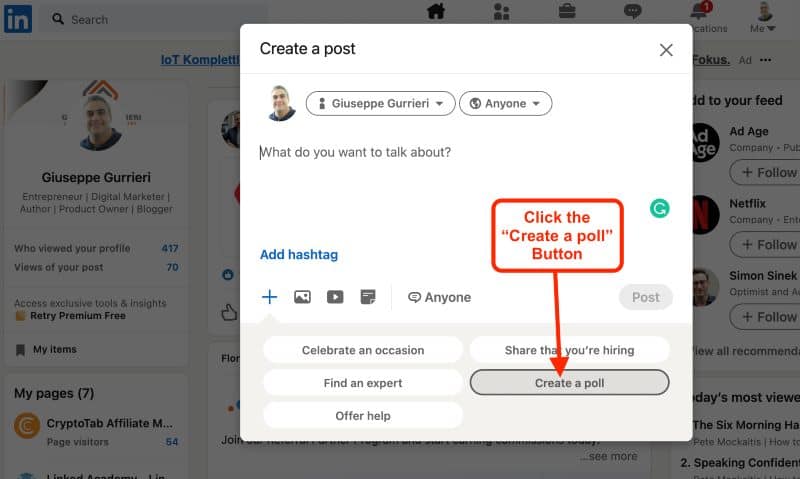
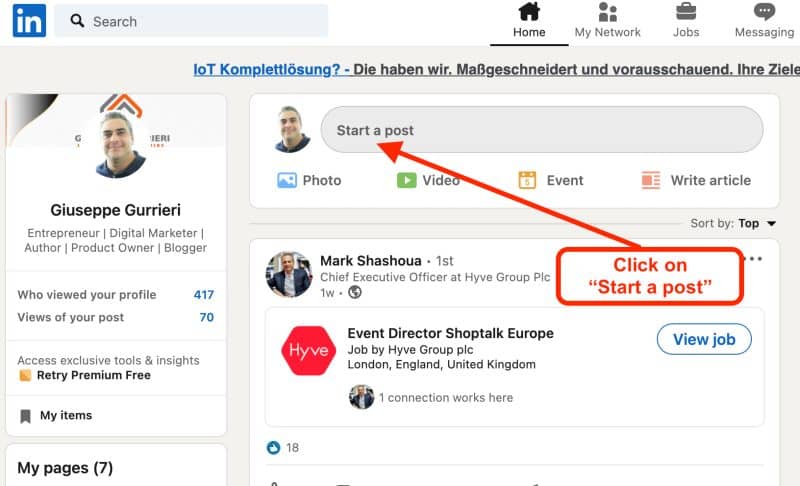
• Step 1: Click on "Start a post" in the Create a Post window and choose the Create a Poll option.
• Step 2: Click on the "Create a poll" button
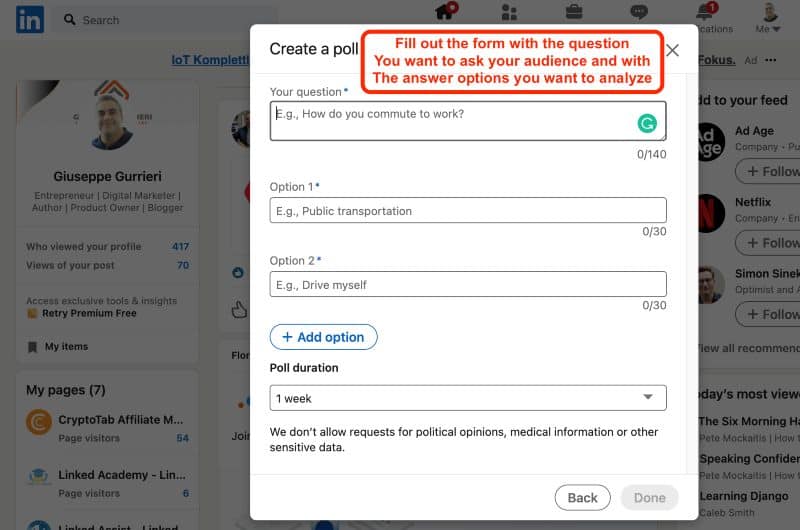
• Step 3: Type in your question and as many survey answer choices as you want:
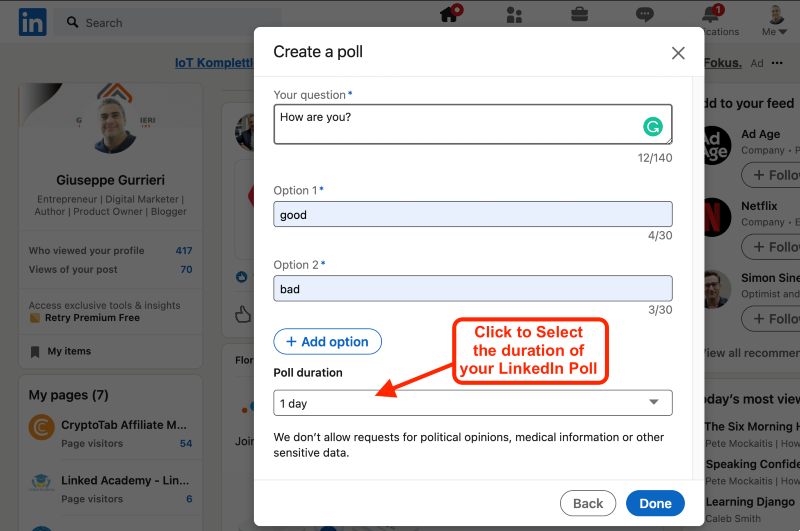
• Step 4: Select a survey answer time limit from the Poll Duration drop-down menu, ranging from one day to two weeks.
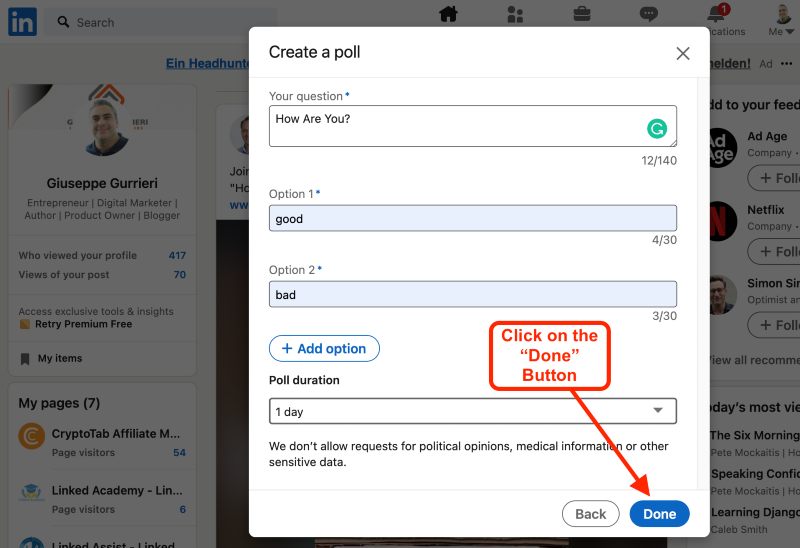
• Step 5: Select Done when you're finished making the poll.
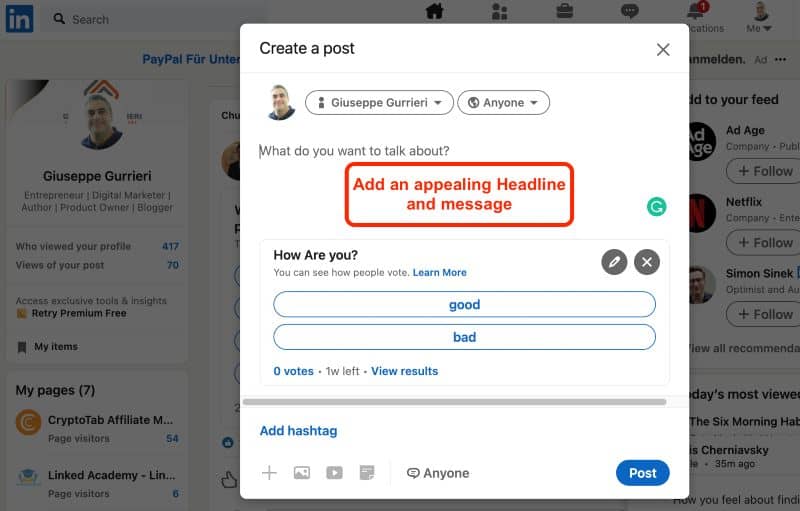
• Step 6: Write the rest of your survey post by adding an appealing headline and message.
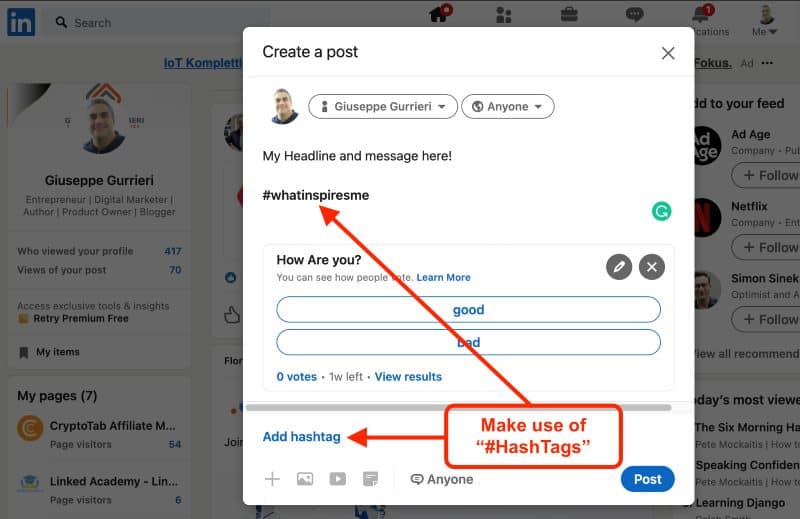
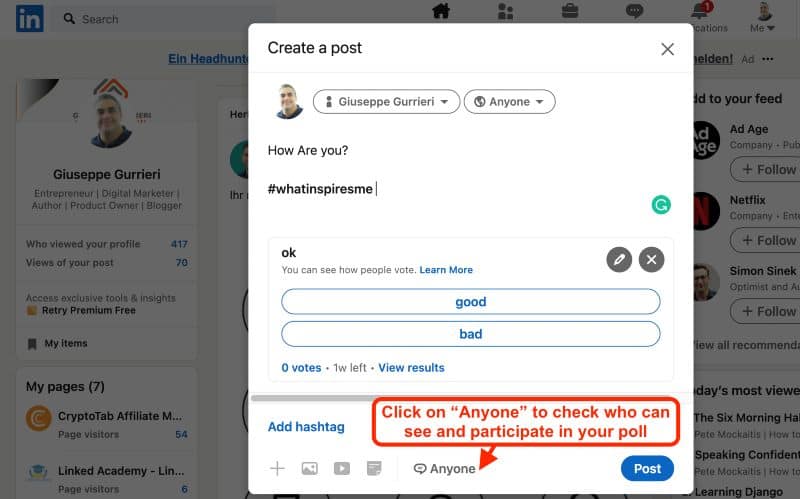
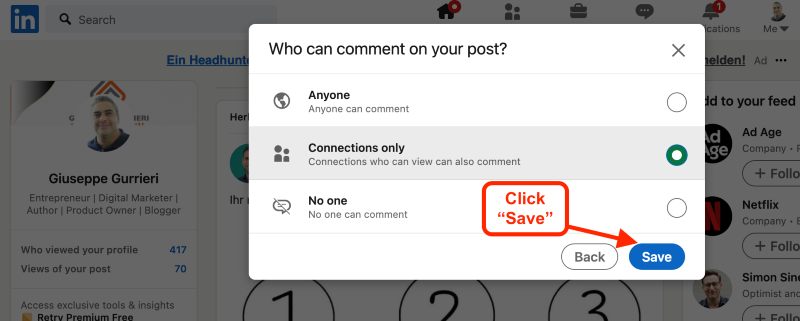
• Step 7: Add 1–3 #hashtags related to your poll subject and choose who can participate in your poll by clicking on "Anyone."
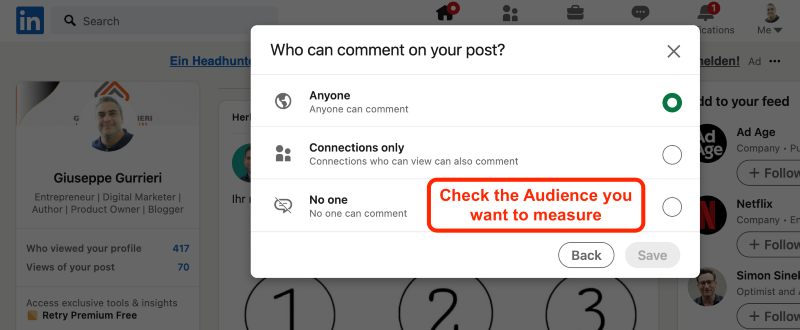
• Step 8: Chose between 3 Audience Options that can Participate in Your LinkedIn Poll to get even responses from people who aren't in your LinkedIn network
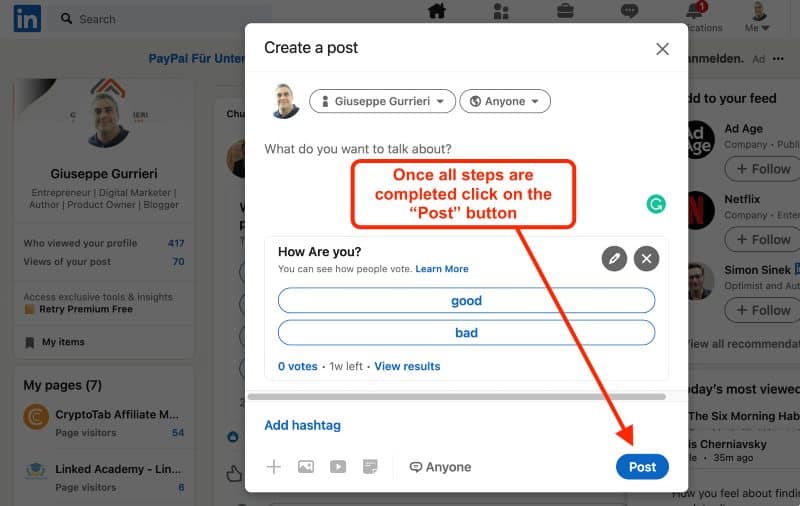
• Step 9: Once you are done completing all given steps, press the post button to share the survey with the world.

https://www.linked-assist.com/blog/how-to-create-and-use-linkedin-polls-for-lead-generation-goals/

Monday, April 19, 2021

How to Create and Use LinkedIn Polls for Lead Generation Goals

If you want to develop your marketing strategies? Have you thought of using LinkedIn Polls?
In this article, we share nine valuable tips to use LinkedIn Polls for lead generation.


How to Make a Poll on LinkedIn
You can create a LinkedIn survey for lead generation in various places on the website, including your professional profile (individual account), business page, showcase page, party, and even inside an event. When your survey is running, and when it ends, you and anyone reading your poll will see how many people have reacted to it.


The measures are the same when you're using a handheld device or a desktop machine to build a vote.


Step 1: To begin, select the option to Create a Post. Click on "Start a post" in the Create a Post window and choose the Create a Poll option.


How to Create LinkedIn Poll
Step 1: Click on "Start a post" in the Create a Post window and choose the Create a Poll option.


Step 2: Click on the "Create a poll" button:


Create a poll


Step 3: Type in your question and as many survey answer choices as you want:


Add survey answers


Since LinkedIn currently only encourages users to choose one answer to a poll rather than several answers, the question should inspire readers to choose the alternative that best suits them.


Step 4: Select a survey answer time limit from the Poll Duration drop-down menu, ranging from one day to two weeks.


Select a Poll Time Limit


Step 5: Select Done when you're finished making the poll.


Complete the Poll


Step 6: Write the rest of your survey post by adding an appealing headline and message.


Poll Post


Step 7: Add 1–3 #hashtags related to your poll subject and choose who can participate in your poll by clicking on "Anyone".


Add LinkedIn Hashtag


Choose between your Network and Anyone on the platform


Step 8: Chose between 3 Audience Options that can Participate in Your LinkedIn Poll to get even responses from people who aren't in your LinkedIn network:


  • Anyone on the platform
  • Your LinkedIn network only
  • Nobody, only you


Check 1 of the 3 audiences


After choosing your target click Save


Check 1 of the 3 audiences


Step 9: Once you are done by completing all given steps, press the post button to share the survey with the world.


Share Your Survey


Please take a look at who replied to the survey after it's over. You'll see the name, headline, and poll comment on LinkedIn.


Tip: Your LinkedIn survey post will be available for a long time after the poll has finished, so if it's anything you want to be visible for a short time, make sure to delete it.


Now that we have learned how to create LinkedIn Polls, we are going to discover nine further ways to use LinkedIn Polls for lead generation goals:


1: Discover the Top Goals of Your LinkedIn Audience


Is the LinkedIn group diverse in terms of industries? Try using a LinkedIn poll to ask your followers what their current priorities are if you're trying to develop new content or campaign ideas for your audience but aren't sure where to start. A LinkedIn poll with four distinct answers will help you narrow down what knowledge and education your audience requires from you to accomplish their objectives.


With this knowledge, you'll be able to create more entertaining LinkedIn content that will increase the chance of turning fans into email subscribers, website users, and, eventually, paying customers.


2: Figure out what kind of content works on LinkedIn


Are you debating whether to produce any valuable content or a series of short, snappy videos for your audience? Learn about the audience's content expectations by conducting a LinkedIn survey.
It will help you create material that your target audience will continue to interact with.


You might also go back to your survey post after posting your first piece of new content to let respondents know that their input has been transformed into something concrete. This follow-up will help you strengthen your friendship and gain credibility in your LinkedIn group by demonstrating that you care for what they have to say.


3: Collect feedback from customers on products and services


Why not ask your LinkedIn community for suggestions if you've just launched a new product or service? A survey can be used in various ways, based on the kind of product or service you're looking for reviews.


However, here is some additional advice to help you keep your creative sauces flowing:


Have you tried our service or product [insert name here new ]?
Which features from our [insert product name] can you use the most?
Have you heard about [insert name here new ]'s product/service?
What are your thoughts on our brand-new [insert product name]? Please give it a rating.


4th: Determine the level of interest in new product or service concepts.
Don't know where to go on your next campaign? Consider using a LinkedIn poll to solicit timely reviews on a few suggestions if you have a large audience with raving fans.


Marketing professionals use LinkedIn polls for lead generation and, most importantly, to find new ways to explain the importance of their services to customers.


This method helps you get direct input, and it will also serve to compile a list of people who may be involved in taking a more in-depth survey off-platform to aid in future market research efforts.


Offering product samples or an exclusive deal to someone who replies to a LinkedIn poll of this kind is another way to follow up.


Following the completion of your LinkedIn poll, you'll be able to see who took part and which choice they want, allowing you to exchange deals with others who are interested strategically.


5: Investigate through the LinkedIn platform to find qualified leads.


If you're having trouble getting people to connect with you on LinkedIn, try using a LinkedIn poll to launch a discussion about a subject relevant to your business.


This quick two-question survey is a perfect way to launch a discussion.


Select a simple question and have 2–3 options for respondents to choose from. Encourage your audience to leave feedback on your LinkedIn poll post to justify their decision better.


Additionally, some discussion starters to help you get started quickly:


While you're doing [insert industry-related activity], do you also..
Is [insert industry-related tool or process] used in your company?
Which of these three strategies would you prioritize if you could only use one in your business?


6: Identify the most pressing issue in your LinkedIn network.


You most likely assist your customers in various ways, particularly if you have a variety of product or service offerings. Using a poll to figure out what issue is at the top of their list to tackle for the next 2–3 months, whether you're in a transitional time of year or want to find out if you can bring more value to your LinkedIn audience.


With the survey results, you will be quite able to pick a product or service to offer to your target audience on LinkedIn.


7: Recognize and Address Knowledge Gaps


Use polls to measure the audience's expertise on a specific subject if you're having trouble determining if your instructional material is too advanced or too straightforward for them. You may do this by telling respondents to choose the most fitting definition of a business acronym or a method you assist your consumers.


Consider the various levels of understanding that people can have about your goods or services, and design your poll response choices to accommodate these multiple levels of understanding. The most frequent responses will provide you with information that will help you decide if your content management strategy needs to be tweaked.


8: Keep an eye out for new industry trends.


Have you seen any changes in your field? Is a new industry-wide strategy gaining traction? It's worth running a LinkedIn poll with a query about an emerging market trend if you provide services to a small niche.


This method is a perfect way to generate appropriate, entertaining content for your LinkedIn Company Page to obtain discussion in the comments section.


You may also use this strategy to re-engage members of an industry-specific LinkedIn community and invite them to share their experiences with the group.


Here are a few possible poll questions to help flesh out this concept:


Is [insert new strategy/approach] being used in your role?
Did you see a spike in requests for [insert new trend] in the last six months?
Have you made [insert new approach] a priority in your organization's planning?
B2B and enterprise-level companies would benefit the most from this kind of LinkedIn vote.


9: Determine the makeup of your LinkedIn audience based on your industry or company position.


Maybe you're the moderator of a LinkedIn group and want to learn more about your members. Perhaps you organized a LinkedIn event and met a lot of new people. Sign up for newsletters and RSVP. Try conducting a LinkedIn poll to get to know the people in your party or event so you can best represent them.


Encourage the audience to choose a group that best fits their job or business as a way to accomplish this. This basic, non-intrusive query will help you determine the most prevalent industry in your LinkedIn community so you can create content that is both interesting and helpful.


Conclusion
That is everything you need to know on how to create and use LinkedIn Polls for Lead Generation, plus nine additional suggestions to get you started. Now it's time to plan how to use LinkedIn polls to generate leads through all publishing options offered by LinkedIn.